


525,659


Free Art Download: Ernest Hemingway with Shotgun

hemingway print with shotgun

Free Art Download: Ernest Hemingway with Shotgun

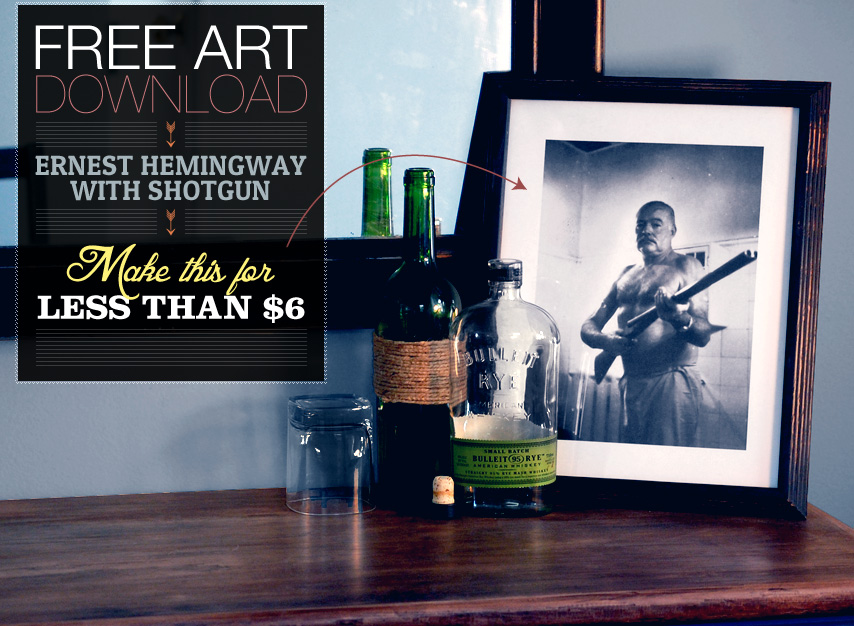
Some guys put movie posters on their walls. Others have a picture of Hemingway holding a shotgun.


Guys don’t fill their apartments with schmancy art because of one reason. It’s expensive. We want to have a nice home, but not at the crazy price that it costs to buy a print of something we like, then having it matted and framed. It’s just not realistic at this point in our lives.

Most end the thought there. Can’t afford it. Can’t do it. But that’s lazy – A little creativity goes a looooong way when it comes to making your home your own on a budget.

I recently stumbled across a company selling cool, old black and white prints of manly things, but the prices were outrageous. One of them was a framed print of Ernest Hemingway holding a shotgun. I thought, “that picture must be on the internet,” and a Google search for “Ernest Hemingway shotgun” with the size filter on ‘large’ provided just what I was looking for.

It turns out that this photo that was being sold for a crazy price, is actually in the public domain, and stored in the National Archives. I downloaded it off of Wikipedia, adjusted the size and levels, and had it printed for…40 cents. I’ve included a download link below, and you can follow my steps in creating a framed and matted print for less than $6.

If you’ve ever framed something, you know how crazy the prices can be for not only the frame, but the matte – the thick white cardboard with a square cut out in the middle. To get past the cost of the matte, I’ve built it into the downloadable image. The image of Hemingway is surrounded by a 1.5 inch white border.

The frame is a black frame from Wal-Mart that sells for only $5. They’ve had them for years, and I just saw them last weekend, so if you have a hard time finding them when you’re there, keep looking (or ask) because they’re there. The image is created to fit in a 11′x14′ frame, as pictured above.

To download, click on the link below, then click on “File” and “Download”.

Step 1: Print It

I had it printed at Staples because they allow you to do it all online, and they’ll e-mail you when it’s ready to pick up. You can print it anywhere if you have large enough paper.

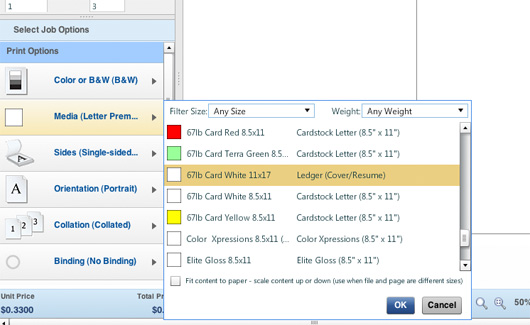
Go to the Staples Copy and Print Center site and choose “Copy and Print Services.” From the options listed, choose ‘Black and White’. When the applet opens, upload the picture by clicking on the Add Files link.
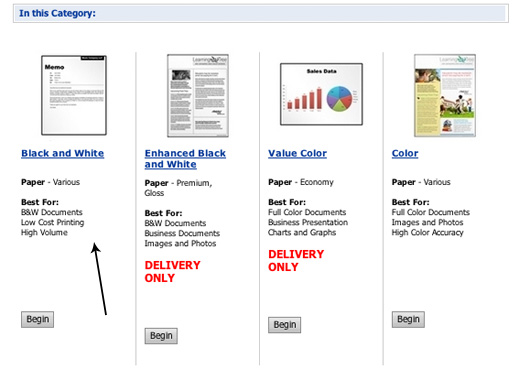
Once finished, click on “Media” and choose “67lb Card White 11×17 – Ledger (Cover/Resume)”. Since 11×14 (the size of our image) is a standard frame size, but not a standard print/paper size, we have to print it on 11×17 paper. The downloadable image includes cut lines on the top and bottom so that it fits in the frame. Continue to checkout and be amazed that it’s only 40 cents.

Step 2: Frame It

Go find the $5 frame at Wal-Mart, or if you don’t have access to one, any 11×14 frame will do. Trim the print on the top and bottom lines, and insert into the frame. I used steel wool on the wood to add a distressed quality to it. Pour yourself a scotch and marvel at your cool, cheap, art.

About

Andrew is the founder and editor of Primer. He's a graduate of American University and currently lives in Los Angeles. Read more about Primer on our About page.

 
  • Colby

    Awesome idea. I used yours as a template for a Townes Van Zandt photo. 

  • jbird669

    Getting this when I click on it:

    Google Docs
    error

    This error has been reported to Google and we’ll
    look into it as soon as possible.Please try one of these interim
    solutions:

    Reload this page.

    Download the document by right-clicking on it in the main document list and
    selecting “Export.”To discuss this or other issues, visit the Google
    Docs Help Forum. To see the list of known problems, check the Google Docs Known Issues page.

    • http://www.primermagazine.com/ Andrew

      Hey Jbird, give it a try now, it’s working on my end. If you’re still having the issue, try logging out of your gmail account.

      • http://www.facebook.com/logandeezy Logan Greer

        I’m receiving this error notification as well.  Logged out of Gmail, still not working.

        • Adam

          I got the error too. I just x’ed out of the error pop-up and was able to download it with no issue.

  • Matt

    Very cool.  Also, very morbid if you think about it – Hemingway blew his brains out with a shotgun.  

    • Shh

      This was the “Before” picture. The “After” picture wasn’t family-friendly.

  • davis

    Anyone have a good resource for finding more free images like this? 

  • http://pulse.yahoo.com/_DST4ISCKSZ4GRZQSL7IJVU53EE Nel

    I also saw this exact same photo in my inbox for $200+ and thought the same thing. You took it to the next step by finding the image. Thanks Andrew!

  • tommyboy

    This is great, this should be a weekly thing

  • TJ

    I’m not very versed in photography or photo editing. How does one “adjust the size and levels” to make sure it is a high quality pic that will print out and look nice? Can I just find a high res picture on the internet and have that printed out? And how does one build in the matte?

  • http://www.facebook.com/adam.barnathan Adam Barnathan

     Awesome idea. In the process of doing this now. Can you give a quick tutorial on how you actually edited and adjusted the picture? Thanks

    • http://www.primermagazine.com/ Andrew

      Hey Adam & TJ,

      Here’s what I did.

      1. Create a new image that is 11″x14″. Use the editing programs rulers to create 1.5″ margins.

      2. Select the inside square created at the intersection of the 4 margins.  This selection represents the ‘hole’ of the matte. To create the matte, we need to select the opposite of what we currently have selected. In Photoshop, go to Select > Inverse. The 1.5″ matte area is now selected. Create a new layer, and fill the selection with white. The matte is now created.

      3. Find the image you want to use. Search Google for your image, making sure it’s very large. If you try to blow up a picture and print it, it will look pixely and soft. 

      4. Open the image in Photoshop, and drag the image to our other image with the matte. Place the layer with the image below the matte layer. 

      5. Adjust the size and framing of the picture below the matte until it’s the composition you want. 

      6. Adjust the levels. “Levels” is the adjustment of black, gray, and white. If you drag the sliders closer together, it makes more gray things black on the low end, and more gray things white on the high end. At the very extreme, placing the levels sliders in the middle would create a stark black and white image.  Adjust them until the image has a nice deep contrast between black and white. This is important since we’re having it printed economically. These prints tend to be very gray and dull anyway. 

      7. Make any other adjustments you’d like.

      8. Print it.

      9. ???

      10. Profit.

      • TJ

        Is there any other program that I could use to do this besides photoshop? Anything that you know that is free? I’d really like to do this with a pic of Frank Sinatra.

        • http://www.primermagazine.com/ Andrew

          You can try Gimp, it’s similar to Photoshop and free.

          • TJ

             Thanks! I will try it and see how it works out.

          • CC

            FotoFlexer is great as well. You can add boarders and change images on their website without having to log in or even downloading a program. Plus it’s very easy to use.

  • jbird669

    To illustrate this point, Huckberry is selling this photo as a sonic edition for $260.

  • Bryan LaFonte

    Great post! I’m heading to Staples to pick up my print tonight after work. I’ll let you know how it turns out

  • TJ

    What brand is the frame?

    • http://www.primermagazine.com/ Andrew

      It’s a $5 Wal-mart frame.

      • TJ

         I understand that but do you remember specifically what brand it is at Walmart? I didn’t see it at the one I went to today, I may have to check some of the other ones in town.

        • http://www.primermagazine.com/ Andrew

          Oh sorry! No, unfortunately I don’t. They’re usually on a mid aisle stand, maybe near electronics or near home goods.

          • TJ

            Found one. Thanks!

            Ignore the wall color, temporary living situation. Also, I didn’t copy you with the bulleit bottle. I really did already have one there.

          • http://www.primermagazine.com/ Andrew

            Looks awesome!!

  • Ricardo

    Awesome. This should be a recurring type of post!

  • Pingback: Make This Giant Map & Frame For Only $30 - Primer

  • SolefulStrut

    I like that wine bottle wrapped in twine.  How did you adhere it to the bottle, glue gun?

    • http://www.primermagazine.com/ Andrew

      Sorry for the late reply. Yep, just twine, hot glue the end when starting, wrap it, and secure the other end.

  • http://twitter.com/Sklib Patrick H.

    I tried sending this to Staples to print and they said they couldn’t do it because it was a copyrighted image. Weird

    • http://www.primermagazine.com/ Andrew

      That’s weird because a) I’m impressed they know what it is and b) it’s in the public domain

  • Pingback: Make These Heritage Coasters for Less Than $10 - Primer

  • Agatha

    This is kind of sad, because Ernest killed himself with a shotgun.

  • Pingback: Free Art Download: RAF Pilot Getting a Haircut Between Missions, 1942 - Primer

  • Erick

    Just created mine! I found a nice $7 wooden frame at TJ Maxx (org. price $25.00) and used my company’s color printer and card stock when no one was looking haha

Primer is proudly spam-free. Unsubscribe anytime.